
Klaviyo List Growth Tracker: Are You Emailing Too Much - or Not Enough?
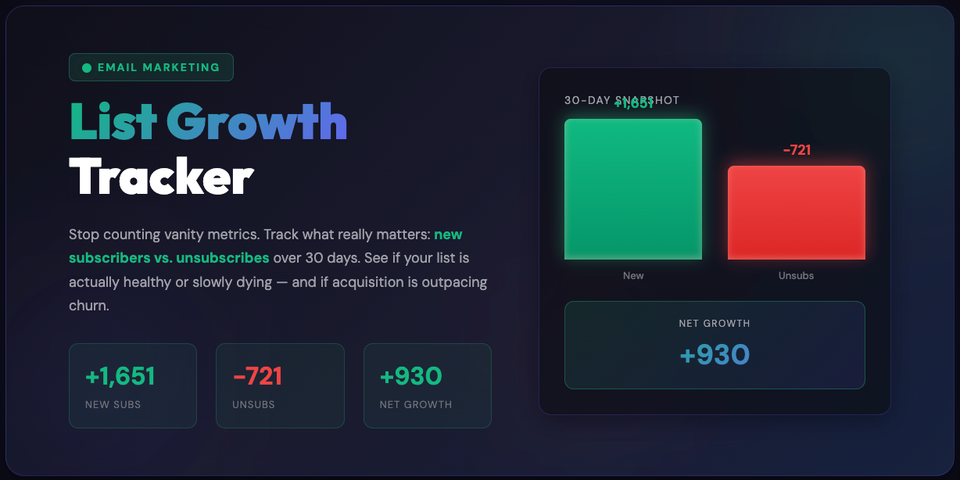
Most email marketers look at total subscriber count and feel good when it goes up.
But that number alone lies.
If you gained 1,600 new subscribers last month and lost 700, your list didn’t really grow — it leaked. And the reason is usually simple:
👉 You’re either emailing too much… or you’re playing it too safe.
That’s exactly why we built the Klaviyo List Growth Tracker.
What This Tool Actually Tells You (In Plain English)
The Klaviyo List Growth Tracker looks at the last 30 days and answers one core question:
Is my email frequency healthy - or am I burning my list?
It breaks your list behavior into four things:
- New subscribers – how many people joined
- Unsubscribes – how many people left
- Net growth – what’s actually left after churn
- Retention rate – how tolerant your audience is to your messaging
This is the metric most brands ignore — and the one that tells you whether you can push harder or need to slow down.
Reading the Results: What the Numbers Really Mean
Here’s how to interpret your Retention Rate 👇
✅ 80–90%+ Retention — You’re in the sweet spot
- Your audience is engaged
- You’re not over-emailing
- You can likely increase frequency slightly
- Great time to test:
- Extra campaigns
- More promos
- Stronger CTAs
Action:
Push a bit harder — your list can handle it.
⚠️ 60–80% Retention — Caution zone
- People are starting to feel fatigue
- Content relevance or timing might be off
- You’re close to the unsubscribe cliff
Action:
Before sending more:
- Improve segmentation
- Reduce generic blasts
- Tighten messaging relevance
🚨 Below 60% — You’re burning your list
- Messaging is too frequent or too irrelevant
- Subscribers feel spammed
- Growth is being canceled out by churn
Action:
Pause aggressive sending.
Fix:
- Targeting
- Value in emails
- Flow logic and frequency caps
This is where brands slowly kill deliverability without noticing.
Why This Matters More Than Open Rates
Open rates fluctuate. Click rates lie.
But unsubscribes never lie.
Your unsubscribe behavior tells you:
- When you crossed the line
- Whether your audience still trusts you
- If scaling email will help — or hurt
How You Can Run the List Growth Tracker
There are three ways to use the automation, depending on how technical you want to get.
1️⃣ API Mode (Recommended)
Connect using a read-only Klaviyo API key.
- Fully automated
- Pulls real data
- No manual work
2️⃣ Manual Mode
Already have the numbers?
- Enter new subscribers
- Enter unsubscribes
- Instantly get retention + net growth
Perfect for quick audits or sharing with clients.
3️⃣ Run It Locally via n8n
Want full control?
- Download the n8n workflow JSON
- Import it into your own n8n instance
- Run it on demand or on a schedule
Great for:
- Agencies
- Internal dashboards
- Advanced reporting setups
What You Should Do After Running It
Once you see your retention rate, don’t just look at it — act on it:
- High retention → test more emails
- Medium retention → fix targeting
- Low retention → fix strategy before scaling
This one metric can save months of list damage.
Email growth isn’t about sending more emails.
It’s about knowing when you’re allowed to.
The Klaviyo List Growth Tracker gives you that signal — clearly, visually, and fast.
If you want help interpreting results or fixing what the numbers reveal — you already know where to find us 😉
Member discussion